
If you build Google Ads Search campaigns in Google Ads Editor, the starting position has just changed. Version 2.14 of the desktop tool, reported on 12 November 2026, turns on three automation settings by default for new Search campaigns, so you now have to opt out rather than opt in.
What Google changed in Ads Editor 2.14
Google’s release notes say AI Max, text asset automation and Final URL expansion “are now activated by default when creating new Search campaigns”, as quoted by PPC Land. Search Engine Roundtable and Relevant Audience both reported the same release.
It is worth being precise about what we know. The change applies to campaigns created in Editor, and Google’s notes say nothing about existing campaigns. They also do not say whether the same default applies in the Google Ads web interface, through the API or when you import campaigns from a spreadsheet. Editor is a global tool and the notes do not limit the change to particular countries, so this is not a UK-specific story, but it affects UK advertisers who use Editor in the same way as everyone else.
Why this is different from the September migration
Google’s own help page on text customisation says campaigns already using it are being upgraded to AI Max from September 2026. PPC Land notes that this earlier migration left Final URL expansion switched off for migrated campaigns. The Editor default is more assertive, because all three settings now start on.
What the three settings actually do
According to Google’s AI Max help page, AI Max is a suite of targeting and creative features with two main parts: search term matching and asset optimisation. Text customisation writes ad copy from your existing ads, landing page copy and assets. Final URL expansion can send traffic to other relevant pages on your site, but only ones Google considers relevant to the query and themed to your ad group.
The two points that matter most for a small account are these. Final URL expansion requires text customisation to be on, and PPC Land reports that it does not respect pinned headlines. If you rely on pinned headlines for legal wording, an offer or a brand line, that is worth knowing before you launch.
How to switch each setting off
The release notes, as reported, do not describe an off switch, but Google’s help pages do cover where each control lives.
| Setting | Where you control it | Worth knowing |
|---|---|---|
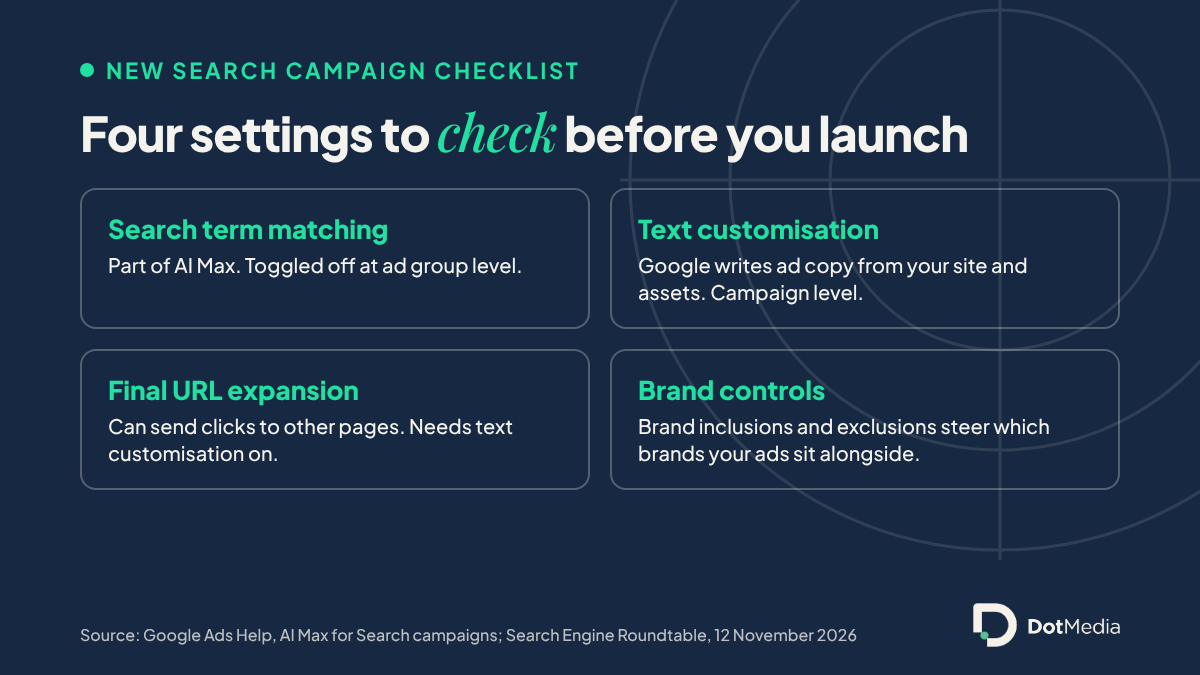
| Search term matching | Ad group settings | Uses broad match, asset-based and landing page-based matching |
| Text customisation | Campaign settings | Turning it off stops assets it generated from serving |
| Final URL expansion | Campaign settings | Needs text customisation to be on |
Source: Google Ads Help pages on AI Max and text customisation. Checked 17 November 2026.
What we would check before launching a new campaign
None of this means AI Max is bad. Google says it can widen reach and, in its reporting, adds an AI Max match type to the search terms report and a “Selected by” column to the landing pages report, so you can see what it is doing. The point is that you should choose it deliberately rather than inherit it.
Check the budget first
Google’s help page says AI Max “won’t be effective if campaigns are limited by budget”. If your daily budget is tight, widening the net with broader matching is the opposite of what the campaign needs.
Check the ad copy and the landing pages
Open the campaign settings after you create it and read what is switched on. Then look at which pages Google can send people to. If you have a page you would rather visitors never landed on, such as an old offer or a thin category page, decide whether Final URL expansion is worth the risk.
Check brand controls
The AI Max help page describes brand inclusions and exclusions, which let you say which brands your ads should or should not appear alongside. For a business with a distinctive name, that is worth setting on day one.
If you are also watching how Google is changing paid search more broadly, our post on Google bringing ads to AI Mode covers the other big shift, and our piece on ChatGPT ads moving to target bidding covers the newer platform.
Conclusion
This is a small default with a large effect for anyone who builds campaigns quickly in Editor. Check the three settings on every new Search campaign, confirm the budget can support broader matching, and look at the search terms and landing pages reports after launch rather than trusting the automation blindly. We have no original performance data on AI Max defaults yet, so we would not read this as a verdict on whether it works, only as a reason to look.
FAQ
Does this change existing Google Ads campaigns?
Google’s release notes, as reported, apply the new default to new Search campaigns created in Editor and say nothing about existing ones.
Is this only happening in the UK?
No. Editor is a global tool and the notes do not limit the change to particular markets.
Can I turn AI Max off for a new campaign?
Google’s help pages say search term matching is toggled off in ad group settings, and text customisation and Final URL expansion are toggled off individually in campaign settings. The release notes do not describe the steps themselves.
What happens to pinned headlines?
PPC Land reports that Final URL expansion does not respect pinned headlines, so check any pinned legal or brand wording before you launch.
Ready to chat? Book a free 15-minute call and we’ll look at how your Search campaigns are set up and whether the new defaults suit your account.